
Direct from manufacturer
90V 246V Vertical Wall Printer Robot
- Place of Origin
- Beijing, China
- Brand Name
- WallNova
- Certification
- CE for machine, RoHS for ink


Factory direct product
USB 3.0 720 - 1220 Dpi CMYK Digital Cylinder Printer Automatic. from Beijing, China.
Product specifications
Consolidated technical specifications
Three of the descriptors in this title are interface and mode values rather than machine capabilities: a USB generation, a resolution band and a four-channel ink set. Taken together they describe a PC-tethered production printer that trades quality against speed across a stated range. The published data behind them is narrow, so the reading below is careful about which claims can be checked and which must be quoted.
| Field | Recorded value |
|---|---|
| Product designation | USB 3.0 720 - 1220 Dpi CMYK Digital Cylinder Printer Automatic |
| Brand Name | WallNova |
| Place of Origin | Beijing, China |
| Certification | RoHS for ink |
| Product family | Digital cylinder UV printer |
| Platform reference | 14109468 |
| Designation descriptors | USB 3.0 interface descriptor, 720 - 1220 Dpi resolution band, CMYK four-channel ink descriptor and automatic operation descriptor, all as stated in the product name |
| Conformity scope | Only an ink-level record is published for this listing. Certification depends on the actual product model and target market. |
The resolution is given as a band, 720 to 1220 Dpi, which is the honest way to state a machine that runs in modes. A band also means a buyer cannot quote a single figure for quality or for speed without naming the mode, and the upper value should be confirmed against the head's native step rather than assumed to be a standard tier.
Reference model series and configuration boundaries
This listing describes a class of machine more than a single unit: nothing in the name fixes a diameter, a print length or a head count. That makes the platform reference and the order schedule the only reliable identifiers, and it makes five configuration questions unavoidable before a price can be compared with another supplier.
| Configuration item | Record basis for this unit | Buyer confirmation point |
|---|---|---|
| Resolution band | 720 to 1220 Dpi, stated as a range rather than a single value | Ask which modes are selectable in the RIP, and which resolution each mode actually produces on a curved part. |
| Data interface | USB 3.0 named as the connection to the driving computer | Confirm the supported operating system, the RIP version and the maximum cable run, since USB is a short-distance link. |
| Ink channels | CMYK, with no white channel named | Establish whether white can be added, because a four-channel machine cannot print on dark or clear containers without a base. |
| Workpiece range | Not stated in the published record | Give the supplier your diameter and length range and require the fixture list in the quotation. |
| Automation | Automatic named without a list of powered axes | Ask for the powered motions and the manual steps separately, then calculate operator touches per unit. |
| Curing | Not described in the record | Request lamp type, count and the cure distance used for the acceptance sample. |
A four-channel CMYK machine is not a downgrade of a five-channel one, it is a different product with a different substrate list. Buyers whose containers are white or light-coloured lose nothing by it; buyers whose containers are amber, green or transparent lose the ability to print at all until a base layer is added.
Engineering practice for a tethered four-channel unit
USB and dpi are the two descriptors buyers argue about least and are surprised by most. The four notes below explain what each one actually limits in daily use, and where an assumption made at purchase turns into a bottleneck on the shop floor.
Machines in this class expose a small set of print modes, and each mode is a package of resolution, pass count and speed. The low end of the band is the production mode used for large flat areas and bold graphics; the high end is the quality mode used for fine text and photographic work. Neither number describes the head itself, which has a fixed native pitch that the modes sub-sample.
What that means commercially is that the machine has no single throughput figure. A job priced at the low end and delivered at the high end will miss its margin, so the mode used for a quotation should be written on the job ticket rather than left to the operator's judgement on the day.
Naming a USB generation indicates a printer driven directly by a computer rather than a standalone unit with onboard storage and a network stack. In practice that is good for colour management, because the RIP runs on the PC and can be updated, and it is awkward for placement, because the computer has to sit within cable reach of the machine.
Passive USB 3.0 cable is specified over short runs, and a workshop that wants the PC at the far end of the room will need an active extension rather than a longer passive lead. That detail is worth settling during the site survey, because an unstable link produces aborted jobs that look like software faults.
CMYK without white works exactly as intended on white, cream or pale containers: the substrate supplies the paper-like base that the process colours need. Move to amber glass, dark green glass or a black tube and the same file prints as a murky image, because there is no reflective layer beneath the ink.
Buyers sometimes plan to compensate with a heavy colour build, and it does not work: the ink is translucent by design, so more of it darkens rather than lightens. The correct answer is either a white-capable machine or a primed container, and both decisions belong before the order rather than after the first rejected batch.
Automatic here refers to the machine's own axes, which index and rotate without the operator turning a handwheel, and to the job sequence once a print has been sent. It does not include the operator's decision about whether the part is seated correctly, which is the step that most affects registration on a hand-loaded fixture.
There is a practical consequence for the computer as well: an operator who is loading parts by hand and watching a screen is doing two jobs, so the RIP PC is best placed beside the loading station rather than in an office.
Colour evaluation between modes should follow a documented procedure rather than the operator's eye. The method applied is agreed for the actual substrate and destination market at quotation stage; naming a method family does not mean this model holds a certificate.
Product description and image documentation
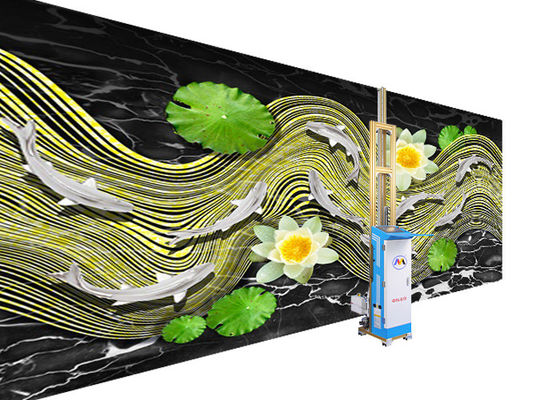
The platform holds four views of this machine under reference 14109468, reproduced below at their intrinsic aspect ratios. Selecting a view opens the enlarged viewer, where Previous and Next or the arrow keys step through the set.


These four views are the entire set held for reference 14109468, with file names unchanged from the media library so each can be traced to the listing. They show the machine and its rotary station; no printed container appears among them, so output quality and the resolution band still require a printed sample.
Independent manufacturer overview
WallNova is the brand attached to this listing and is described on the platform as a digital wall printing technology manufacturer, with production in Beijing and commercial contact handled from Shenzhen. The data below identifies the supplier; it does not describe the configuration of any particular machine.
| Qualification aspect | Scope statement |
|---|---|
| Ink conformity | RoHS recorded for the ink set shipped with this listing, assessed independently of the machine. |
| Machine conformity | No machine-level conformity document is listed for this unit in the published record. |
| Certificate applicability | Certification depends on the actual product model and target market. |
| Electrical scope | Supply voltage, phase and input current are not stated here, so the site circuit cannot be specified from the listing alone. |
The electrical row matters more than it looks: a machine described by its data interface rather than its supply class gives the electrician nothing to work with. Ask for voltage, phase and input current with the quotation, and have the site checked against those figures.
Questions this configuration actually raises
These questions follow from the three unusual descriptors in the title, namely a USB generation, a resolution band and a CMYK-only ink set. General import and payment questions are handled in the quotation.
Both, in different modes. The band describes selectable print modes rather than one head capability, and each mode pairs a resolution with a pass count and a speed. Ask for the mode table so that you know what each setting costs in time, then fix the mode on the job ticket rather than leaving it to the operator.
Because the printer is driven by a computer over a direct cable rather than operating as a standalone networked device. That is normal for a machine of this class and it keeps the RIP on a PC that can be maintained and updated. It does mean the computer has to be within the cable distance the supplier specifies.
Not without a white base, and no white channel is named in this designation. Process inks are translucent, so on amber glass or a clear tube they read as a stain rather than an image, and building more ink does not fix it. Either specify a white-capable configuration or plan on pre-primed containers.
USB 3.0 over a passive cable is specified for short runs, so a workshop layout with the computer across the room usually needs an active extension rather than a longer passive lead. Confirm the figure the supplier supports and check the actual distance on the site survey, because a marginal link shows up as aborted jobs rather than as a clean error.
It covers the powered axes and the sequence inside a job: rotation, indexing, carriage travel and the print cycle. Manual steps such as loading, seating the part correctly, cleaning and unloading stay with the operator unless a feeder is quoted. Counting those touches per unit is the realistic way to estimate labour.
The published record lists RoHS for the ink and no machine-level document. Certification depends on the actual product model and target market, so a buyer needing a machine certificate for customs should request it explicitly and check that it names the shipped unit and the destination rather than the product family.
A target that tests fine text and a photographic gradient at both the high and low modes, printed on the containers you actually sell. Compare the modes side by side, check registration around the circumference, and keep one accepted sample of each mode as the reference for later reprints.
Verification before order and before dispatch
Most of the risk in this listing sits in what the title leaves out rather than in what it says. The checks below close the gaps that matter commercially, and they are additional to the usual import documentation.
| Check | What to ask for | Why it decides the order |
|---|---|---|
| Mode table | Every selectable resolution with its pass count and speed. | A band without a mode table cannot be converted into a price per unit or a shift plan. |
| Substrate suitability | Confirmation that your container colour works with a four-channel set. | Dark or clear containers need a white base, and the absence of that channel is disqualifying rather than inconvenient. |
| PC requirements | Operating system, RIP version and cable distance supported. | A tethered machine is only as reliable as the computer and link driving it. |
| Electrical data | Voltage, phase and input current in writing. | The listing describes a data interface and no supply class, so the site circuit cannot be sized from it. |
| Fixture list | Diameter range and mandrel sizes for your containers. | No workpiece range appears in the record, so this is the only way to know if your parts fit. |
| Mode-matched samples | One accepted print at each mode you intend to sell from. | Reprints at a different mode will not match, and without a sample there is no baseline for comparison. |
Any item that cannot be answered from a document should stay open in the quotation. On a machine described by its interface, the unanswered questions are technical rather than commercial, and they are cheapest to resolve before the order is signed.
Direct from manufacturer
Direct from manufacturer

Direct from manufacturer